Is a Portable Second Monitor Worth Carrying?
Measure the whole kit and check the video path first. A portable display pays off when it solves a recurring delay away from your regular desk.
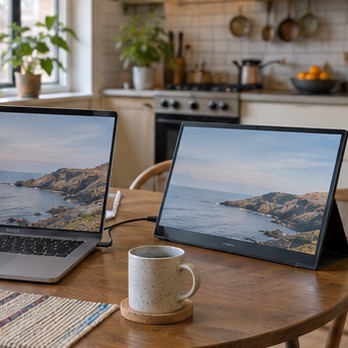
At a relative’s kitchen table, you are editing a document while looking up figures in a separate window. Every time you switch back, you lose your place. A portable monitor could help here, especially if working away from your usual desk is part of a regular routine.
Think about what goes on that second screen. A chat window or a checklist can work on a compact panel. A timeline or a spreadsheet with wide columns may need a larger surface and more room on the table.
Check the video and power paths
Before buying, find which port on the laptop can send video and whether the monitor accepts it over USB-C. Look at the cable requirements in the manual. The included cable can be more useful than the generic charging cable you already carry.
Some portable screens accept HDMI and draw power through a separate cable, which can help with an older laptop. Check what the monitor needs at the brightness you expect to use. A separate charger adds another item to pack and an extra socket to find.
Compare the whole travel kit
The advertised weight may describe only the panel. Add the stand, cover, cables, and any adapter. Measure the laptop bag sleeve and compare it with the monitor’s outer dimensions. A second screen that stays at home will offer little benefit on the trip.
A built-in kickstand takes less time to set up on a crowded table. A folding cover can save carrying a separate stand if it holds the angle you need. Look for photos showing the cable exit at that angle so it will clear the edge and leave space for your mouse.
Let the trip decide the purchase
On your next trip, count the tasks where switching windows interrupts your train of thought. If you mostly write and reply to email, improving your keyboard shortcuts or using split windows may be enough.
If you frequently compare documents or need to keep a meeting open while presenting, a portable display has a clear job. Choose the smallest screen that shows the tools you need at a comfortable scale. During the return window, test it on the table and battery setup you normally use.
Further reading
Related guides
Cable Management for a Rental Desk
Tidy a rented desk with reusable ties, a compact tray, and repairs you can do without leaving screw holes.
A Home Printer for the Pages You Actually Print
Shipping labels and school worksheets call for different features than photo projects. Look at your last few print jobs before buying.
How to Choose a Monitor for a Shallow Desk
A monitor with the right stand and comfortable text scaling can make a small desk easier to use. Start with the space behind your keyboard.