How to pick a portable drive for backing up phone photos
Compare a plug-in flash drive, a portable SSD, and a laptop transfer around the way you shoot and store files.
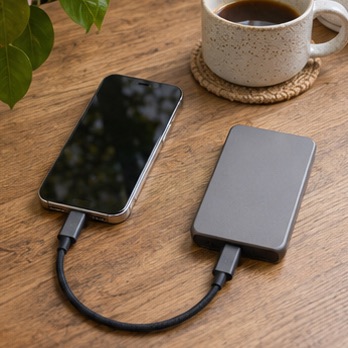
At the end of a trip the phone is full of video clips, restaurant photos, and screenshots you want to keep. Wi-Fi is slow and the laptop stayed home. A small drive can help if it can connect to the phone and show up in a file manager you already know how to use.
First separate backup from storage cleanup. A drive provides another copy only while the originals still exist somewhere else. If you delete every file from the phone immediately, the drive may become your only copy. Decide where the other copy will live before you start clearing space.
Check the phone and the file system
Look up which external drives and file formats the phone supports. Apple’s iPhone guide lists supported file systems and describes opening storage in Files. Google has instructions for USB storage in Files by Google. Use the phone maker’s documentation alongside the file app instructions to confirm the model, connector, and external storage setup.
Also check which computers will need to read the drive later. If you decide to change the drive’s file system, copy any existing files somewhere safe first. Formatting generally erases what is already stored.
Decide whether speed or size matters more
A small plug-in flash drive makes sense for occasional photo folders and documents. An SSD with a short cable can make a larger video archive easier to handle and may sit more comfortably on a table compared with a long drive sticking out of the phone. For fast transfers, match the capabilities of the phone port, cable, and drive. If the phone supplies limited power, check whether your chosen setup requires a powered adapter.
If you already take a laptop on most trips, consider transferring through it. A familiar file manager can simplify organizing a season’s photos and verifying the backup.
Practice with a few clips
At home, copy a handful of files, including a longer video, and open them from the drive on another device. Check the folder names, confirm the files play, and leave the originals alone until you have a second verified copy. For longer trips, start a folder for each day or location so you can tell at a glance what you have copied.
Further reading
Related guides
Tablet keyboard case or Bluetooth keyboard? Choose for where you type
Compare a laptop-style case with a separate stand and keyboard before adding weight to your tablet.
A small phone tripod for filming at home
For recipes, repairs, and craft tutorials, choose a mount according to camera position, stability, and the room you have.
How to share one USB-C charger between your laptop and phone
The number on the box only tells part of the story. Read the port chart to see what your devices actually get.