Clean your keyboard before you replace it
Start with a brush and a lint-free cloth. Save bigger purchases for the parts that are actually worn.
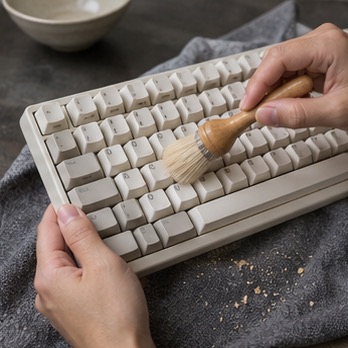
The dust between the keys has become visible on video calls, and a crumb under the spacebar makes it feel uneven. A new keyboard might be tempting, but a short, careful cleanup often tells you whether grime or actual wear is the problem. Start by checking your keyboard maker's guidance for the model in front of you.
Round up a clean, soft brush and a lint-free cloth. Disconnect the cable, turn off a wireless board and remove user-replaceable batteries if the maker calls for it. Work over a clear table so you can see loose debris and avoid losing a tiny part.
Do the outside first
Use the dry brush to loosen dust around the cap edges. Wipe the exterior with the lint-free cloth and check the results in side light. For a mark that survives, consult the manual for a cleaner appropriate to the surface and follow its directions for applying it to the cloth. Keep liquid away from openings. Avoid reaching for household sprays that could damage the finish or leave sticky residue.
Thin laptop-style boards often have fragile cap mechanisms. Keep them assembled unless the manufacturer gives model-specific removal instructions. A keycap puller designed for a standard mechanical board can be the wrong tool for a scissor mechanism.
Remove parts only if the board supports it
If your mechanical board has removable caps, photograph the layout before taking any off. Start with ordinary letter keys and leave stabilized keys, such as the spacebar, in place until you have read the instructions. Use a compatible puller and pause if a cap resists. When putting each cap back, check the row and orientation against the photo.
Buy a tool or part for a specific problem
A soft brush and cloth cover most routine desk dust. Spend on a compatible puller if you actually need to lift mechanical keycaps. If the legends are worn through or the case is damaged, identify the affected part and check the replacement cost before buying a whole kit. If the board has had a liquid spill, power it down, keep it disconnected and consult the manufacturer's service guidance before trying it again.
Further reading
Related guides
A practical first keyboard remap
Move one awkward shortcut, learn where the setting lives and avoid paying for more programmable keys than you need.

The keyboard worth packing for a café workday
Choose a travel keyboard by checking bag fit, real table space, sound and the first connection of the day.

The quiet keyboard buying guide
A good late-night keyboard starts with the right switches, a steady spacebar and a desk that doesn't amplify every keystroke.